[How-to] Move your cockpit screens to the tablet with one tap (Auto pop-out) 中文

[How-to]Turning knobs: outer ring, inner ring, push

A dual concentric knob on an avionics panel is a circle on the tablet.

  1. Circle your finger around the outer ring = coarse adjustment (for example MHz, or heading in 10° steps).
  2. Circle near the center = fine adjustment (for example kHz, or heading in 1° steps).
  3. Tap the center = PUSH (press the knob).

The faster you turn, the bigger the jumps, just like a real knob.
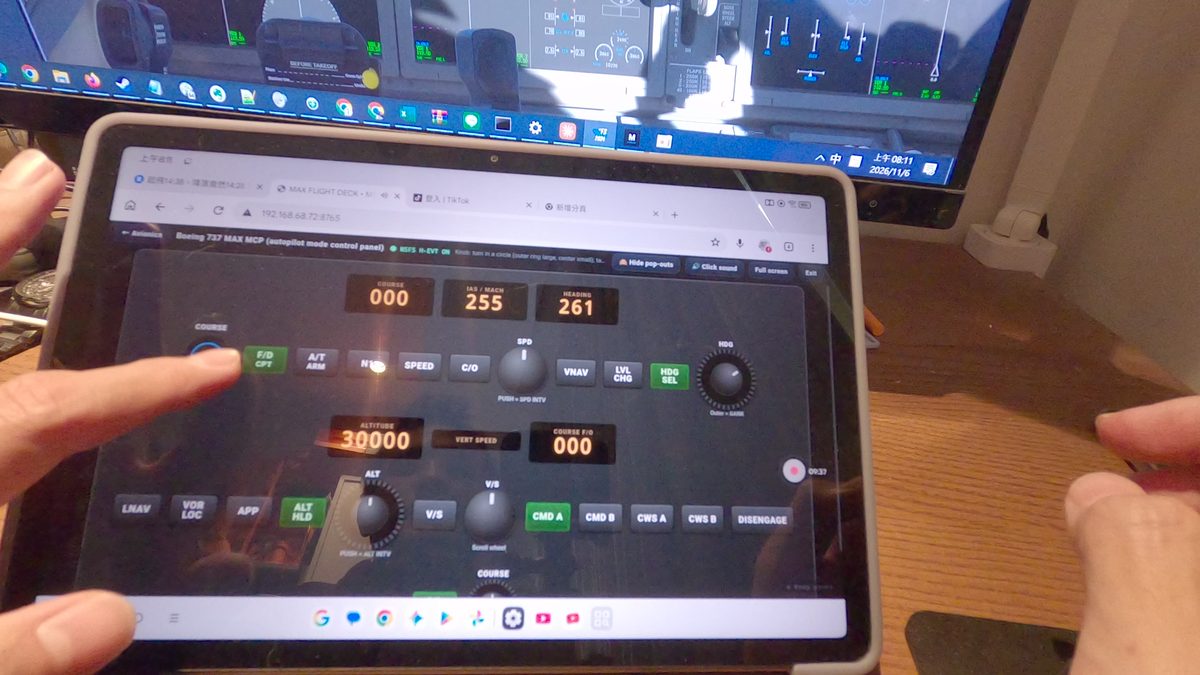
Circle your finger to turn: 737 MAX MCP

Further reading

[How-to] Signing in to your Max account

Max Flight Deck uses a Max account (sign in with Google).

  1. On the PC main window, go to "Settings → Max account → Sign in with Google".
  2. Your browser opens the boyu.tw sign-in page. Choose your Google account; the first time, you'll be asked to accept the membership terms.
  3. When you're done, the browser hands the sign-in back to the program automatically. There's nothing to type.

One account can be open on only one PC at a time. When you switch PCs, press "Use on this PC" on the new one and the old one stops.